The York County court docket is the official record of all scheduled court proceedings in the county. It provides a daily schedule of court sessions, hearing listings, and trial dates, allowing attorneys, parties, and the public to know when cases will be heard. The docket ensures that court activities are organized and transparent, supporting efficient case management across the county. It is important to understand the difference between a docket calendar and a docket sheet. A docket calendar shows the overall schedule of court sessions for a day or week, highlighting hearings, trials, and motions in each courtroom. In contrast, a docket sheet provides detailed information about a specific case, including filings, motions, and prior rulings. Together, they allow users to track individual cases while viewing the broader schedule of the courts.
York County operates both Common Pleas Courts and Magisterial District Courts, each with its own docket system. Common Pleas Courts handle major civil and criminal cases, family law matters, and jury trials, while Magisterial District Courts manage smaller civil disputes, traffic offenses, and preliminary hearings. As a result, the docket schedule differs depending on the type of court, and users must refer to the appropriate court for accurate hearing dates and session details. By regularly consulting the York County court docket, individuals can confirm trial dates, plan attendance for hearings, and monitor case progression. Whether reviewing the calendar for upcoming court sessions or checking a docket sheet for case-specific updates, the docket is a key tool for staying informed about judicial proceedings. This system ensures clarity, accountability, and orderly management of legal matters throughout York County.
How to Search the York County Docket
Accessing York County docket sheets and court calendars online lets you check scheduled hearings, trial dates, and individual case details from anywhere. The county and statewide systems provide free public docket access, including UJS docket search tools where you can look up cases by number, participant name, or event dates. Below are the main methods for searching the York County docket online, with instructions and official links.
Using the Pennsylvania UJS Portal
The Pennsylvania Unified Judicial System (UJS) Web Portal is the state’s official platform for searching court case information and docket sheets across all counties, including York County. This is ideal if the case you want might involve criminal, civil, appellate, or magisterial court listings.
Official UJS Portal links:
- Case Search Main Page: https://ujsportal.pacourts.us/casesearch
- UJS Home Page: https://ujsportal.pacourts.us/
- Common Pleas Docket Sheets: https://www.pacourts.us/courts/courts-of-common-pleas/docket-sheets
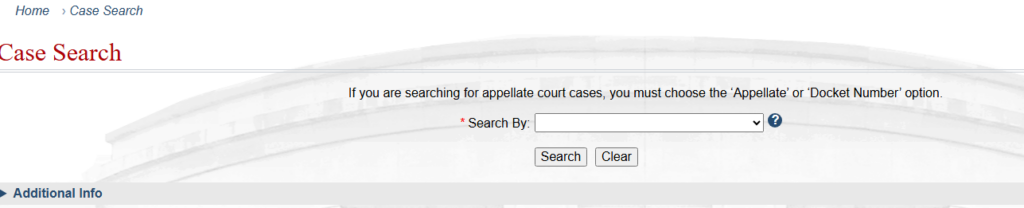
Using the York County Prothonotary Case Search
The York County Prothonotary’s Office provides its own public search tool focused on civil and certain family or related cases filed in county courts. This system offers Prothonotary docket access, along with filtering options like case category and date range.
Official Prothonotary Search:
- York County Prothonotary Case Search (ProthySearch): https://prothysearchnew.yorkcountypa.gov
Steps to Navigate Prothonotary Search:
- Visit the Prothonotary Case Search link above.
- Agree to any disclaimer or notice about the search tool’s use.
- Choose how to locate cases you can do a case status lookup by case number, conduct a participant lookup by names, or filter results by case category.
- Adjust the date range if needed to focus on older or more recent filings.
- Submit the search and review the results. Click individual cases to see docket details, listed actions, and filings tied to that case.
Viewing or Downloading Docket Sheets and Calendars
Once you’ve found the case or search results you need, you can view or save the docket information in several formats. Many systems allow you to download printable PDF docket sheets or current court calendars for scheduled hearings.
Where to Find Printable Dockets:
- On the UJS portal result pages, docket sheets often include a button or link to view the case details and print a PDF. This will show listed court events including past hearings and future scheduled sessions.
- Some courts also post court calendars or daily session listings that you can save or print directly from the site. These often show scheduled hearings across case types and help users track upcoming events.
How the York County Court Docket Works
The York County Court docket is the official record of scheduled court activities, serving as a central reference for attorneys, litigants, and the public. It outlines case events, court session types, and timing for hearings and trials, ensuring the county’s judicial system operates efficiently. Understanding how the docket works helps users track trial dates, follow ongoing matters, and navigate the legal process effectively.
York County Court Docket Overview
The docket functions as the court’s official schedule of cases and hearings. Each entry includes the parties involved, case type, assigned judge, and the timing of court sessions. The information is essential for planning appearances, preparing filings, or monitoring case progress.
York County operates multiple court levels, each maintaining its own docket types:
- Common Pleas Court – Handles major civil disputes, serious criminal cases, family law matters, and jury trials.
- Magisterial District Judges (MDJs) – Manage minor civil cases, small claims, traffic offenses, and preliminary hearings.
Court Docket vs Court Calendar
It is important to distinguish between a court docket and a court calendar:
- Court Docket – A detailed record of all filings, motions, and case events for individual cases. It may cover months or years of activity.
- Court Calendar – Provides a day-by-day or week-by-week schedule of court sessions and hearings. Useful for quickly viewing upcoming hearing dates and trial dates.
York County also provides PDF yearly docket calendars, which include:
- Scheduled sessions for each court division (Common Pleas and MDJ)
- Updates for new filings or changes in session times
- Public access to plan appearances in advance
Trial Dates vs Hearing Dates
The difference between trial dates and hearing dates is key:
- Trial Dates – Full trials involving multiple witnesses, evidence presentation, and sometimes a jury.
- Hearing Dates – Procedural sessions such as motions, status conferences, or preliminary matters.
Common Pleas Docket vs MDJ Calendars
By understanding the York County Court docket and related calendars, users can monitor filings, track trial dates and hearing dates, and access the correct court schedules. Maintaining awareness of court docket schedules and updates ensures compliance with deadlines and accurate preparation for court appearances.
The Common Pleas docket and MDJ calendars differ in scope and complexity:
- Common Pleas Docket:
- Complex civil and criminal cases
- Jury trials, divorce, custody, and major civil litigation
- Detailed case events tracking multiple courtrooms
- MDJ Calendars:
- Minor criminal offenses, small claims, and landlord/tenant disputes
- High-volume routine matters processed quickly
- Simplified schedule for efficiency
York County Hearing Schedule & Docket Updates
The York County hearing schedule provides a detailed outline of all court sessions and events planned across the county’s court system. It is essentially a timetable showing when cases will be heard, which courtroom will be used, and the type of proceeding scheduled. These schedules are part of the broader docket updates that help attorneys, parties, and the public stay informed about court activity. A typical hearing schedule lists the case number, parties involved, assigned judge, and the specific court session time.
For example, a schedule may show:
“Case 2023-CV-1452 – Smith v. Johnson – Civil Motion Hearing – Judge Brown – Courtroom 3B – 10:00 AM”
This kind of listing gives a clear snapshot of the day’s court events, showing the type of hearing and the expected session time. Hearing schedules are updated regularly to reflect new filings, changes in trial dates, continuances, or other modifications.
How Often Dockets Update
Docket updates occur as needed to ensure the public record accurately reflects current court activity. Updates may happen daily, especially in divisions with high volumes of cases, such as criminal and family courts users relying on the York County hearing schedule should check the official portals frequently to confirm any changes in trial scheduling or session times.
- Civil cases may be rescheduled due to continuances or settlement agreements.
- Criminal cases can shift based on plea hearings, motions, or jury availability.
- Family law hearings, such as custody or support matters, often update quickly if mediated agreements are reached.
Typical Hearing & Event Types
York County courts schedule a variety of docket event types across different divisions:
- Criminal Hearings – Preliminary hearings, arraignments, motions, and jury trials.
- Civil Hearings – Motions, status conferences, depositions, and trials.
- Family Court Events – Divorce proceedings, custody hearings, child support reviews, and protective order sessions.
Common Problems & How to Fix Them
When accessing the York County court docket online, users sometimes encounter issues that make it difficult to track cases or verify hearing listings. Understanding the most common problems and how to address them can save time and prevent confusion.
Case Not Found in Search
This may happen if:
- The case is very recent and hasn’t been entered into the online system yet.
- The search criteria are incomplete or contain misspellings.
- The case is sealed or restricted due to privacy rules, such as juvenile or sensitive family law matters.
Fix: Ensure all details are accurate, including correct spelling of party names, docket numbers, and date ranges. If the case is new, try checking again after a few days. For restricted cases, contact the Clerk of Courts directly for guidance on access.
Docket Not Showing Updates
Sometimes, a user may notice that the docket does not reflect recent filings or changes. This can happen because:
- Court staff update the system periodically, not in real time.
- Some events, such as continuances or new filings, are processed manually before appearing online.
Fix: Refresh the system or re-enter search criteria periodically. Consider checking the court calendar for upcoming hearings, which may reflect changes before they appear on individual docket sheets. Contacting the court for verification is recommended for urgent matters.
Calendar vs Case Docket Confusion
Users often confuse the court calendar with the case docket. While both list events, they serve different purposes:
- Court Calendar – Shows daily or weekly schedules of all hearings and trials. Useful for knowing when courtrooms are in session.
- Case Docket – Provides detailed information about an individual case, including filings, motions, and prior hearings.
Fix: Determine whether you need a general schedule or case-specific information. Use the calendar to plan attendance and the docket sheet to track case events and updates. Understanding the distinction reduces errors in scheduling and prevents missed appearances.
Additional York County Court Resources
For individuals needing case lookup help or other court-related assistance, York County provides several official resources. The Clerk of Courts York County and Prothonotary offices manage docketing events, filings, and scheduling, ensuring that court records are accurate and up-to-date.
Clerk of Courts / Prothonotary Contacts:
- Clerk of Courts Office: Handles criminal case filings, docket updates, and scheduling inquiries. Phone: (717) 771-9604
- Prothonotary Office: Manages civil case filings, family law matters, and maintains court records. Phone: (717) 771-9605
- Official website and contact page: https://yorkcountypa.gov/169/Clerk-of-Courts?utm_source=chatgpt.com
Self‑Help Center:
York County offers a self-help center with frequently asked questions and guidance on common court procedures. Users can access information on how to search for cases, understand docket sheets, and track hearing dates. This is particularly useful for individuals representing themselves or seeking clarification on procedural matters.
- Self-Help Center: https://yorkcountypa.gov/742/Records-Check-Request?utm_source=chatgpt.com
Court Forms Related to Scheduling:
The county provides downloadable forms for motions, continuances, hearing requests, and other procedural filings. These forms allow users to request scheduling changes, submit documentation for docket updates, or confirm court session times.
- Official forms page: https://yorkcountypa.gov/333/Forms?utm_source=chatgpt.com
By using these court resources, individuals can efficiently access official records, verify docketing events, and obtain assistance for case-related matters. The combination of office contacts, online forms, and self-help guidance ensures that parties have reliable support for case lookup help and scheduling inquiries.
Freqyantly Asked Questions
This section addresses common court docket questions and provides practical answers for users trying to navigate hearing schedules and case tracking in York County. The FAQs are written to clarify how the docket works, how to access it, and how to interpret the information.
What is a docket sheet?
A docket sheet is the official record of all filings and events related to a specific case in York County courts. It lists motions, hearings, trial dates, and other actions taken in the case. Unlike a general court calendar, which shows scheduled sessions for all cases, a docket sheet focuses on one case and provides a timeline of legal activity. Accessing a docket sheet allows attorneys, parties, and the public to track case progress accurately.
How do I find my York County court date?
To find a scheduled hearing or trial date, users can check the York County hearing schedule. You can access this information through the Pennsylvania UJS Portal or the York County Prothonotary Case Search (ProthySearch). By searching with the case number or the parties’ names, the system will display upcoming court sessions and assigned courtroom information. Always confirm the session time before attending, as schedules may change.
Can I search the docket by case number?
Yes, searching by docket number is one of the fastest ways to locate a case. Both the UJS Portal and the Prothonotary Case Search allow case number lookup, which returns the full docket sheet, including past hearings and scheduled events. If you do not know the case number, you can also search by party name or date range to locate the docket.
How often does the docket get updated?
Docket updates occur regularly, but not always in real time. New filings, continuances, and other changes may take several hours or days to appear online. Users should check the portal frequently, especially for upcoming hearings, to ensure the information matches the most recent court session times. For urgent matters, contacting the Clerk of Courts directly is recommended.
Are docket schedules publicly available?
Yes, most docket schedules are public and can be accessed online. Some exceptions apply for sensitive cases, including juvenile matters or sealed family law cases. Public access ensures transparency in court proceedings and allows individuals to monitor hearing listings and case progress without visiting the courthouse in person.
Where can I find the court calendar?
The York County court calendar is available as a PDF or online through official county portals. It lists daily or weekly court sessions, including both Common Pleas and Magisterial District Judge calendars. Calendars provide an overview of scheduled hearings, trials, and motions across multiple divisions, helping users plan attendance and track upcoming events.